

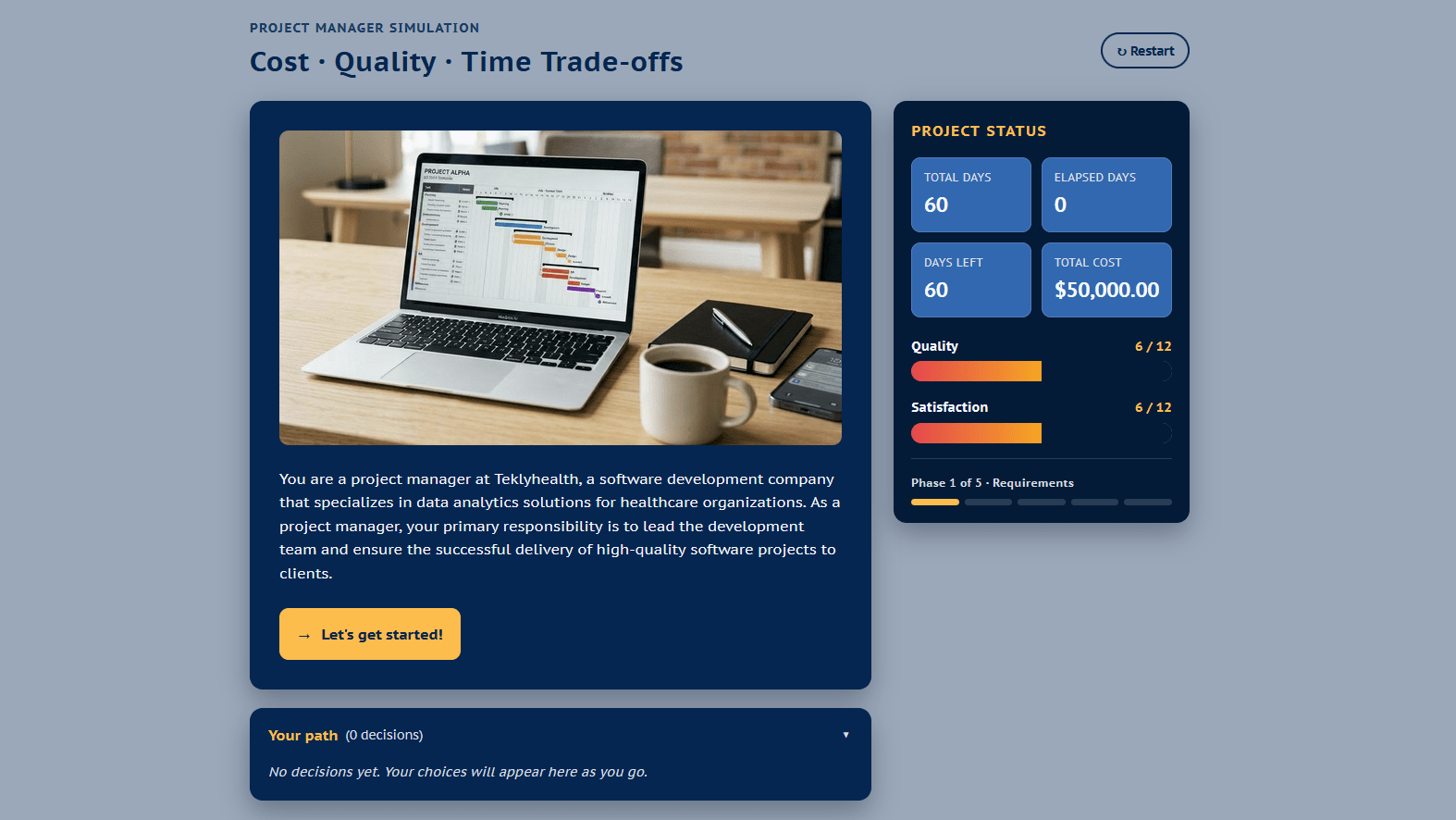
Back in March 2024, I built a project management scenario for modeling tradeoffs of cost, time, and quality. I built the original in Twine, and it was one of the first projects where I used Midjourney to generate consistent character images. I still like how the simulated project status dashboard shows the effects of your choices. The total days to completion, days remaining, cost, quality, and satisfaction increase or decrease depending on your choices. Those adjust dynamically based on variables. But, while the character images were great at the time, image generation has come a long way in two years. That project status dashboard wasn’t responsive, and I was never completely happy with the visual design. So, I decided to do a refresh of that project. I’m updating my project management scenario with Claude helping me redesign the interface, and I’ll work in Flora to generate new character images. This is the first of a series of working aloud posts where you can see my process.
The original scenario
You can try the original scenario to see where I started. Pay attention to the project status dashboard at the bottom and how it changes based on the decisions you make. If you want to see the branching structure and learn about my process for this first version, check out my previous post Project Management Simulation: Modeling Tradeoffs in a Scenario.
The updated scenario (a work in progress)
You can also try this updated version of the scenario. Note that this is a work in progress; most of the images are placeholders, and I haven’t fully tested everything in the new UI yet. Some elements may be broken or behave unpredictably. Consider this an alpha version.

Initial pass updating the UI in Claude
From Twine, you can export to Twee format. Without getting too far into the technical details, just know that Twee format can be saved as a .txt file just by changing the file extension. Claude can understand Twee format in a text file, so that’s typically how I work with Claude and Twine together.
Here’s my initial prompt:
This is a branching scenario I built in Twine for practicing decision-making for project managers, specifically about the trade offs between cost, quality, and time in projects. I’d like to refresh it with a more modern design. The attached file is the Twee format (saved as a .txt file).
What to keep:
All the text of the dialogue and choicesThe elements of the project dashboard (elapsed days, cost, etc.)Overall color scheme
What to change:
Make it responsive so it adjust for smaller screens. The current dashboard doesn’t work on phones.Add placeholders for images (I’ll generate some new ones–AI image generation has improved a ton since 2024).A way to add those images (maybe just put everything in a folder with the right file names? open to better ideas)Update the overall styling for buttons and UI to be more modern and clean
The final output should be HTML that I can upload for my blog and website.
Do you have any questions about the output and what I want before you get started? If not, you can build it and we’ll iterate from there.
Iterations
As is always the case in working with AI, I did some iterations back and forth to make improvements. The initial layout Claude designed was a big improvement from my original, but the color contrast was really low in some areas. The buttons weren’t as obviously clickable as I wanted, and they had an odd hover effect that changed the size. The dashboard was responsive, but it also took up a lot of space on small screens.
So, I went back and forth. The good news is that you can do all of this vibe coding without necessarily knowing the technical code that needs to change. However, you need to be able to clearly describe what you want, even if it’s not in technical language. Vague directions aren ‘t as effective.
Then, although I started with my own improvements for the iterations, I also asked for ideas with this prompt: “What other suggestions do you have to make this better?”
Claude suggested several additional improvements:
Better accessibility
A running decision trail
Animated metric changes
A richer ending summary
Progress or phase indicator
Some other small polish items
I prioritized the accessibility improvements, decision trail, and progress indicator.
UI and structure improvements
Through those iterations, I got to the version you see now. I had Claude summarize all of the changes, but its summary was wordy. So, you’re getting my bullet points instead.
Platform and structure: This is now a single self-contained HTML file with Javascript rather than using the Twine and Harlowe format.
Responsive: On desktops, the project dashboard sits in a sticky sidebar. On phones, it collapses to s compact top bar. The dashboard metrics were reformatted as cards.
Images: Claude replaced the images with placeholders; that’s the next part I’ll work on.
Visual and brand styling: My overall original color scheme was retained, but the visual elements were modernized with a card-based design with rounded corners and subtle shadows.
Accessibility: A “Skip to decisions” skip link was added, and the dashboard was given a labelled landmark. The meters have concise ARIA labels. The focus now moves to the top of each new passage on navigation. All interactive elements have visible focus rings for keyboard users.
Your path and progress: A running log of your decisions appears below the decisions so you can see the cause and effect of your choices. At the bottom of the dashboard is a phase tracker to show progress without pretending the branching is linear or that all the paths are the same length.
Cost of using Claude
I used Claude through my Poe subscription. Poe gives me access to all the major LLMs plus a number of image, video, and audio tools for $200/year. My costs may not reflect what you’d pay working in Claude directly.
For the initial build and all of the iterations, the cost for my tokens was $5.75. I worked on this off and on while also working on another project, so I don’t have a great time estimate. It was probably about 60-90 minutes of work.
Next post: Images in Flora
This post is already over 1000 words, so I’m breaking it into a series. In my next post about this project, I’ll share how I used Flora to generate new images.
Check out my collections of posts on AI and Instructional Design and on Storytelling and Scenarios for more.
Upcoming events
Crafting Choices That Challenge: Designing Scenarios for Authentic Practice. July 15 at 12PM Pacific / 3PM Eastern. Register for this free webinar hosted by Training Mag Network.
Scenario-Based eLearning Design Certificate: Strategies to Engage, Motivate, and Transfer Skills. 3 online sessions starting August 5. Register now; only a few spots left!
Creating High-Quality AI Media: Prompting, Scripts, and Consistency. October 8. Register for the ATD AI Intensive.
DevLearn

Branch Smarter, Not Harder: Naming Conventions, Variables, and Bottlenecks in Storyline
November 3, 2026 at 9:20 AM
CE01: Storyline & Rise Pro Lab
Cohesive by Design: Generate Consistent AI Icons, Illustrations & Characters
November 4, 2026 at 10:00 AM
BYOD (Bring Your Own Device)


